Importing Response Level Data
Introduction
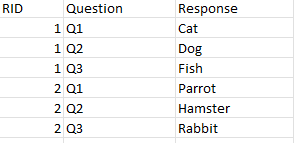
The Import Data Wizard in Codeit allows you to import 'Response Level' data from a csv, excel or text file. In this layout, each row represents a single answer to a single question on a survey as opposed to the usual layout where each row represents a whole interview.
This page explains how to import response level data in Codeit.
Response Level Layout
An example for the layout is as shown below.
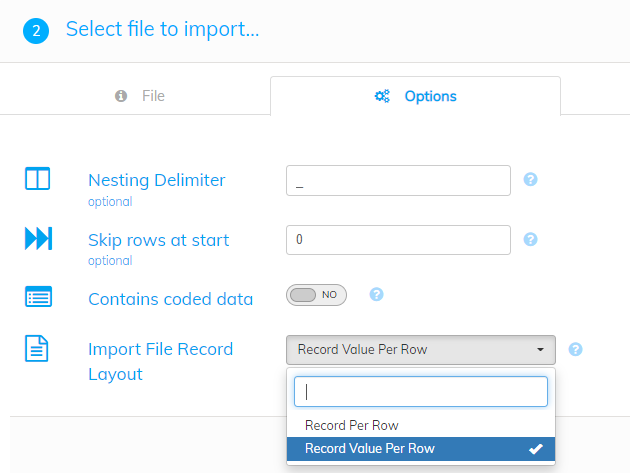
Select appropriate Import File Record Layout
When you select a file with 'Response Level' data for import, select 'Record Value Per Row' for Import File Record Layout in the Options page.
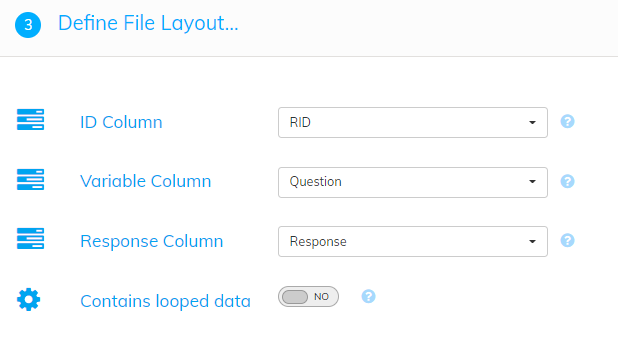
Define the File Layout
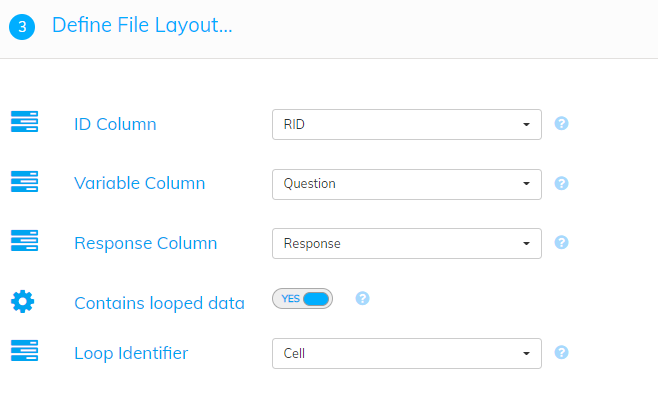
When you select 'Record Value Per Row', a page will be shown next allowing you to choose the columns in your file that contains the respondent identifier, the variable identifier and the responses to import for each row.
After defining the file layout, continue with the import wizard as usual to import your data into Codeit.
Iterative Data
It is also possible to import 'Response Level' data which is iterative.
An example for iterative response level data is as shown below:
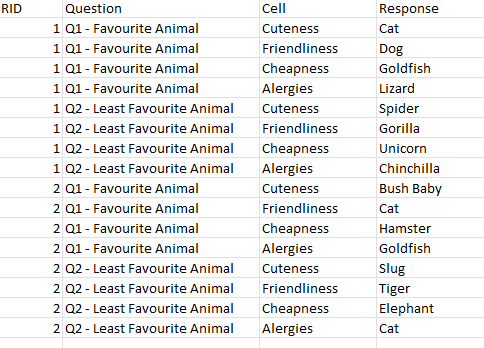
When you have iterative response level data in your import file, in the 'Define File Layout' page, click the checkbox for 'Contains looped data'. When you select 'Contains looped data', a further 'Loop Identifier' option becomes available. This option allows you to choose the column in your file that contains the loop identifier for each row.
Continue with the import wizard to import iterative response level data into Codeit.