Introducing Project Delegation
Introduction
Sometimes you may not have the coding resources in-house to undertake the coding necessary for a project.
You may therefore want to use the resources offered by a coding services provider.
However, you (and they) may not be comfortable with the provider logging in directly to your account.
Instead, you may want to simply delegate the project to your provider.
This article explains the concept of project delegation in Codeit and how to use it.
Delegated Projects
Under normal circumstances, when you create a project in Codeit, it is only visible within the company it was created within.
Project Delegation in Codeit allows a project to become visible within multiple companies.
This allows you to delegate a project to a service provider with clean lines of separation. Your internal details (e.g. Users) and theirs are kept separate and private and only the project itself is visible to both parties.
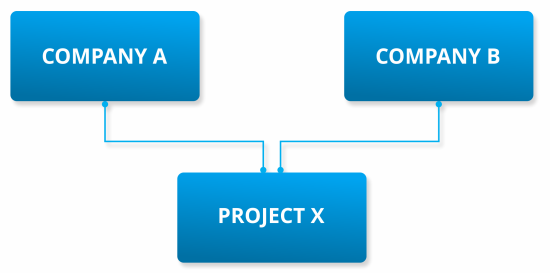
Both companies are free to work on the delegated project as per normal.
Setup
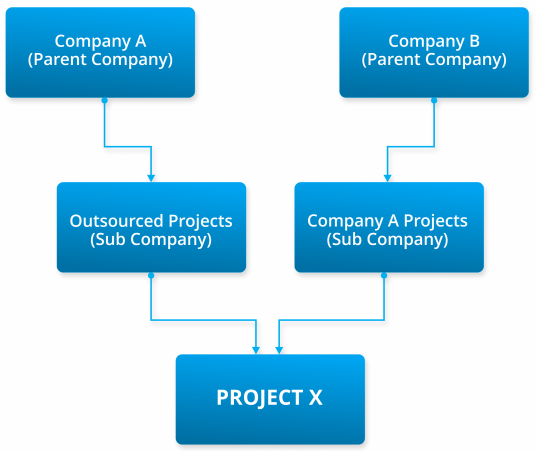
As a further level of separation and control, we recommend that you create a dedicated subcompany for projects you wish to delegate to a specific provider..
This is a neat way to organise projects and gives you flexibility if, later, you wish to add other suppliers or handle projects in-house.
Similarly, your provider will probably want to create a subcompany on their side to keep things organised.
This kind of setup would look as follows:
Configuration
Currently, Codeit doesn't offer an interface to configure the delegation of projects.
However, our support team can easily apply the necessary configuration such that all projects created within a given (sub)company are automatically delegated to a partner (sub)company.