Showing Codes Applied by AI
Introduction
The AI in Codeit has the ability to automatically apply codes to items in a task.
It is often useful to know which codes have been applied by a user and which codes have been applied by the AI. For example, a coder may want to review codes added by the AI for checking purposes.
Similarly, it can be useful to know which layer within the AI (i.e. text matching, text rules, machine learning) was responsible for adding codes to an item. For example, a coder may want to review how well the text matching rules are performing against a set of text.
This article explains how the features in Block Coding allow you to view these AI details.
Coded by AI Indicator
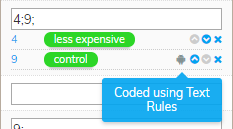
By default, it is easy to differentiate codes applied by AI, as they will have a small 'robot' icon next to them as below:

In this instance, the 'less expensive' code was applied by a human coder, while the 'control' code was applied by AI, which is denoted by the icon.
Hovering over the icon indicates which layer the AI used to apply the code:
Filtering Verbatims Coded by AI
If you want to limit the items displayed on screen to just those coded by the AI, then there are two ways to approach this.
If you just want to see verbatims coded by the AI for a specific code in the codeframe, right-click on the codeframe item and hover over 'Show (...) Coded By AI'.
There are three options available to you:
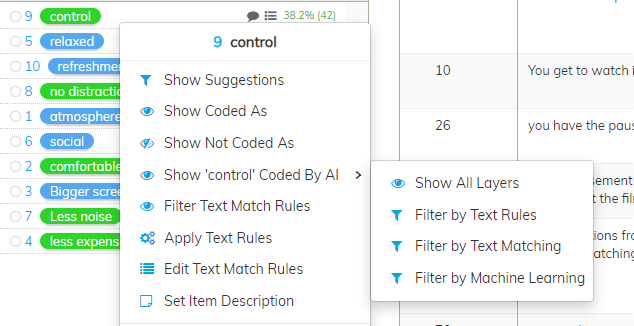
- Show All Layers shows you all of the verbatims where the code has been applied by the AI regardless of the AI layer used.
- Filter by Text Rules shows you all of the verbatims where the code has been applied using the Text Rules layer.
- Filter by Text Matching shows you all of the verbatims where the code has been applied using the Text Matching layer.
- Filter by Machine Learning shows you all of the verbatims where the code has been applied using the Machine Learning layer.
Alternatively, if you want to view verbatims where any code in the codeframe has been applied by the AI, right-click anywhere in the codeframe and hover over 'Show All Coded By AI':
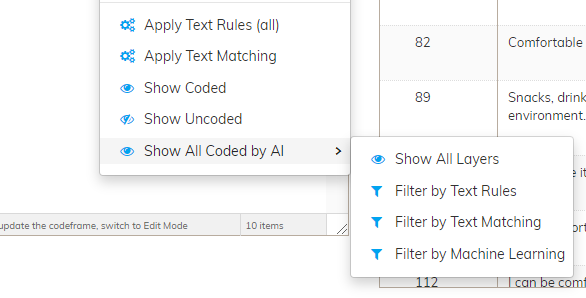
The three options available here are identical to the options outlined above, but in this case apply to all codes in the codeframe.