Understanding Project Permissions
Introduction
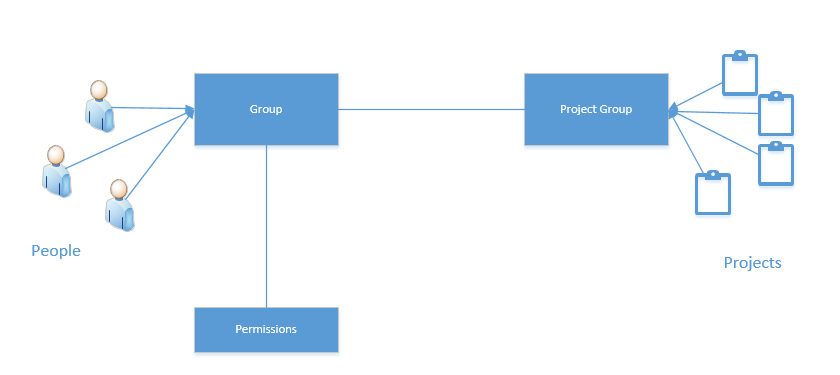
To make the management of permissions easier over a large numbers of users and projects, Codeit has a system of groups.
Rather than assign permissions individually to a user or a project, you can allocate people and projects into groups and simply apply permissions to the groups.
The permissions for an individual user therefore are derived from any groups they are a member of and any permissions applied to those groups.
The user will then receive permissions for all projects in the project groups assigned to users groups.
Accessing Permissions
In order to access the permissions system in Codeit, you must already be defined as a company administrator.
When you log into Codeit, you will need to access the "Administration" page from the navigation ribbon:
When you log into Codeit, you will need to access the "Administration" page from the navigation ribbon:

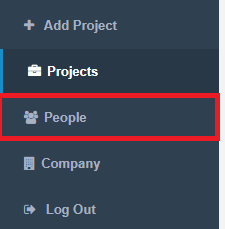
Once in the "Administration" page, you can access the Permissions section by clicking "People" in the left-hand navigation menu:
Project Groups
To create a project group, click the "Project Groups" tab then press the "Create Project Group" button.
Once your group is created, you can add projects to it by clicking the projects link for that group.
To create a project group, click the "Project Groups" tab then press the "Create Project Group" button.
Once your group is created, you can add projects to it by clicking the projects link for that group.

Groups
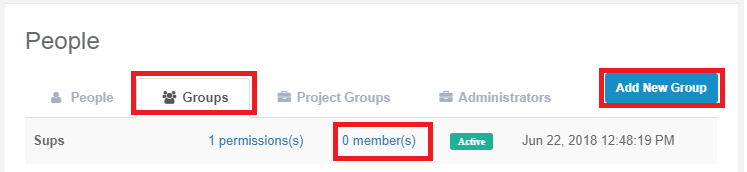
To create a group of users, click the "Groups" tab then press the "Create Group" button.
Once your group is created, you can add people to it by clicking the members link for that group.
Permissions
To assign permissions to a project group, click the permissions link for the relevant project.
To create a group of users, click the "Groups" tab then press the "Create Group" button.
Once your group is created, you can add people to it by clicking the members link for that group.
Permissions
To assign permissions to a project group, click the permissions link for the relevant project.
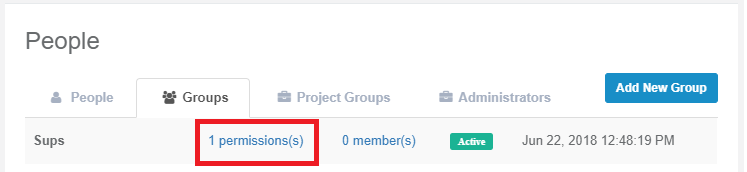
This page then allows you to assign roles to the group. Each role defines a set of actions that a user is allowed to perform.
The roles are as follows:
| Action | Role | ||||
|---|---|---|---|---|---|
| Coder | Codeframe Editor |
Supervisor |
Project Owner |
External Client |
|
| Tasks | |||||
| Create Tasks | No | No | No | Yes | No |
| Read Tasks | Yes | Yes | Yes | Yes |
Yes |
| Update Tasks | No | No | No | Yes |
No |
| Delete Tasks | No | No | No | Yes |
No |
| Waves | |||||
| Create Waves | No | No | No | Yes |
No |
| Read Waves | Yes | Yes | Yes | Yes |
Yes |
| Update Waves | No | No | No | Yes |
No |
| Delete Waves | No | No | No | Yes |
No |
| Projects | |||||
| Read Projects | Yes | Yes | Yes | Yes |
Yes |
| Update Projects | No | No | No | Yes |
No |
| Delete Projects | No | No | No | Yes |
No |
| Records | |||||
| Import Records | No | No | No | Yes |
No |
| Export Records | No | No | No | Yes |
Yes |
| Variables | |||||
| Create Variables | No | No | No | Yes |
No |
| Read Variables | No | No | No | Yes |
No |
| Update Variables | No | No | No | Yes |
No |
| Delete Variables | No | No | No | Yes | No |
| Coding | |||||
| Code Records | Yes | Yes | Yes | Yes |
No |
| Verify Records | No | No | Yes | Yes |
No |
| Codeframes | |||||
| Create Codeframes | No | No | No | Yes |
No |
| Read Codeframes | Yes | Yes | Yes | Yes |
No |
| Update Codeframes | No | Yes | Yes | Yes |
No |
| Delete Codeframes | No | No | No | Yes |
No |
| Codes | |||||
| Create Codes | No | Yes | Yes | Yes |
No |
| Read Codes | Yes | Yes | Yes | Yes |
No |
| Update Codes | No | Yes | Yes | Yes |
No |
| Delete Codes | No | Yes | Yes | Yes |
No |
| Stats | |||||
| View Progress Stats | Yes | Yes | Yes | Yes |
Yes |
| View Productivity Stats | No | No | Yes | Yes |
No |
| View Consistency Stats | No | No | Yes | Yes |
No |
|
AI |
|||||
| Run AI | Yes | Yes | Yes | Yes | No |
|
Data Links |
|||||
| Sync Data | No | No | Yes | Yes | No |