Verify - Page Anatomy
Introduction
This page provides a basic orientation to the Verify screen in Codeit.
Verify Screen
The Verify page in Codeit appears as follows:
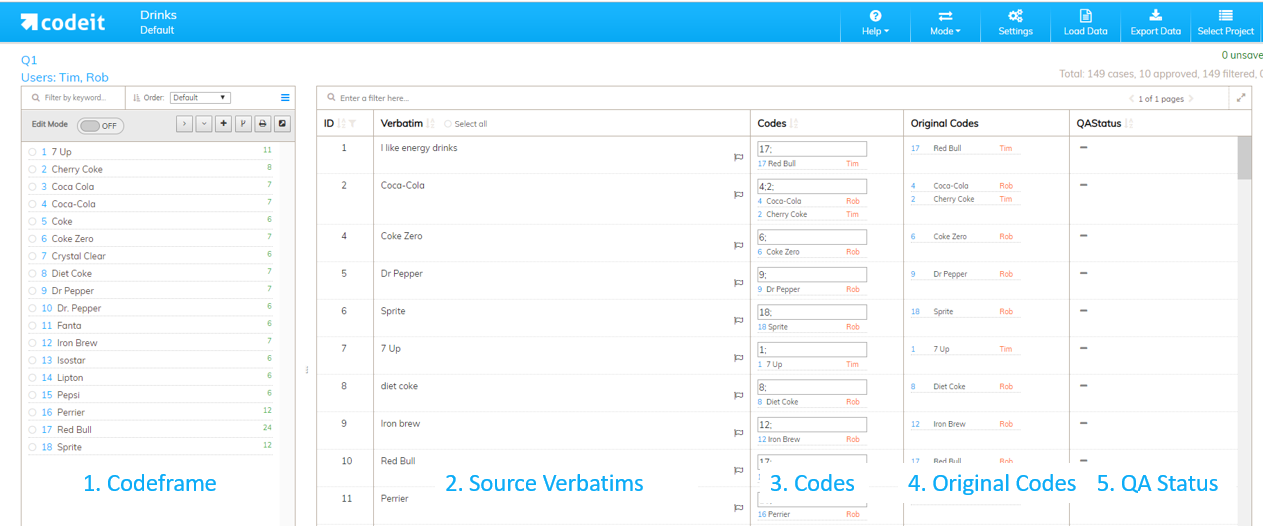
The purpose of each of these sections is as follows:
| Section | Description |
|---|---|
| 1. Codeframe | Displays the current codeframe. The codeframe functions in exactly the same way as it does in each of the coding screens. It can also be edited and manipulated in exactly the same way as in each of the coding screens. For more information on working with codeframes, see the Working With Codeframes page. |
| 2. Source Verbatims | Displays the source verbatim for each record displayed. |
| 3. Codes | Shows the codes applied to each text item. The codes applied to each record can be edited by typing in the corresponding textbox. This is identical to the method used to apply codes in each of the coding screens. |
| 4. Original Codes | Displays the codes applied to each record at the start of the current Verify session. This enables you to keep track of records that have been changed by you during the current Verify session. |
| 5. QA Status | This field allows you to edit the QA approval status of each record. There are three possible values that this field can be set to as follows: - Not Set - Approved - Rejected For more information on how to approve records, see the Approving Records page |